Executando grandes modelos de linguagem (LLMs) em dispositivos móveis costumava ser um sonho do futuro. Hoje, with the release of Google Gema 4 Family and the powerful LiteRT-LM Estrutura, delivering high-performance, multimodal models directly to a smartphone is not only possible, but also extremely efficient.
Nesta postagem, we explore the architectural leaps in Gemma 4, how LiteRT-LM orchestrates on-device inference, the role of Qualcomm’s QNN for NPU acceleration, and the practical technical changes required to build a production-ready Android application for a 2.58GB AI model.
A gema 4 arquitetura
Google’s Gemma 4 represents a significant leap for open-weight edge models Gema 4 E2B (Effective ~2 billion parameters) The model is specifically tailored for mobile and edge environments and brings several key innovations:
- Native multimodality: Unlike previous iterations that only contained text, Gema 4 natively understands text, images and audio. It uses a variable aspect ratio vision encoder that allows it to process images at different resolutions without compromising context.
- Embeddings per Layer (PLE): This technique reduces the memory footprint of embeds, which is crucial for devices with shared RAM architecture like Android phones.
- Shared KV cache: Improves the efficiency of context management, allowing the model to easily handle up to a 32K token context window while minimizing storage peaks.
The engine architecture: LiteRT and LiteRT-LM
To run a model of this complexity on Android we use LiterRT (formerly TensorFlow Lite) next to it LiteRT-LM (LiteRT for large models). Understanding the difference between the two is key to mastering AI on device.
LiteRT: The execution layer
At the lowest level, LiterRT is the runtime engine responsible for executing the static calculation graph of the neural network. It takes the mathematical operations (MatMul, Add, Softmax) defined in the .litertlm (or .tflite) file and maps them across physical hardware delegates.
- XNNPack delegate (CPU): Highly optimized vector math for ARM cores.
- OpenCL/ML drift (GPU): Uses parallel computing functions on the Adreno GPU.
- QNN Delegate (NPU): Shifts quantized integer operations to the Hexagon NPU for maximum efficiency.
LiteRT-LM: The orchestration layer
Large language models require much more than just executing graphs. They require an active, stateful loop. LiteRT-LM acts as a C++ orchestration layer (elegantly packaged in a Kotlin/JNI API) that sits above LiterRT. It abstracts the enormous complexity of LLM inference:
- Native tokenization and detokenization: Instead of relying on Python or slow Java implementations, LiteRT-LM binds directly to a highly optimized C++ tokenizer (typically SentencePiece or BPE) to encode text, áudio, and vision tokens into the integer arrays Gemma expects.
- KV cache management: In LLMs, predicting the next word requires remembering the previous context. LiteRT-LM automatically allocates, manages, and updates the Key-Value (KV) cache tensors for each generated token. Gema 4 deals with the new skillfully Shared KV cache Architecture to minimize memory requirements.
- Sampler configuration: It manages the autoregressive generation loop and applies algorithms like top-K and top-P sampling natively in C++ before feeding the selected token back into the LiteRT graph.
- Multimodal content routing: It grabs arrays of Content.ImageFile and Content.AudioBytes, passes them through the specific vision/audio encoder subgraphs, and projects them into the unified embedding space along with text tokens.
Enter Qualcomm QNN
The Samsung S25 Ultra (powered by the Snapdragon 8 Elite) features a powerful Hexagon NPU. By using the Delegate of the Qualcomm Neural Network (QNN).LiteRT can offload the massive matrix multiplications of the transformer blocks from the CPU/GPU directly to the NPU. This dramatically reduces power consumption and thermal throttling and maximizes the number of tokens per second (TPS).
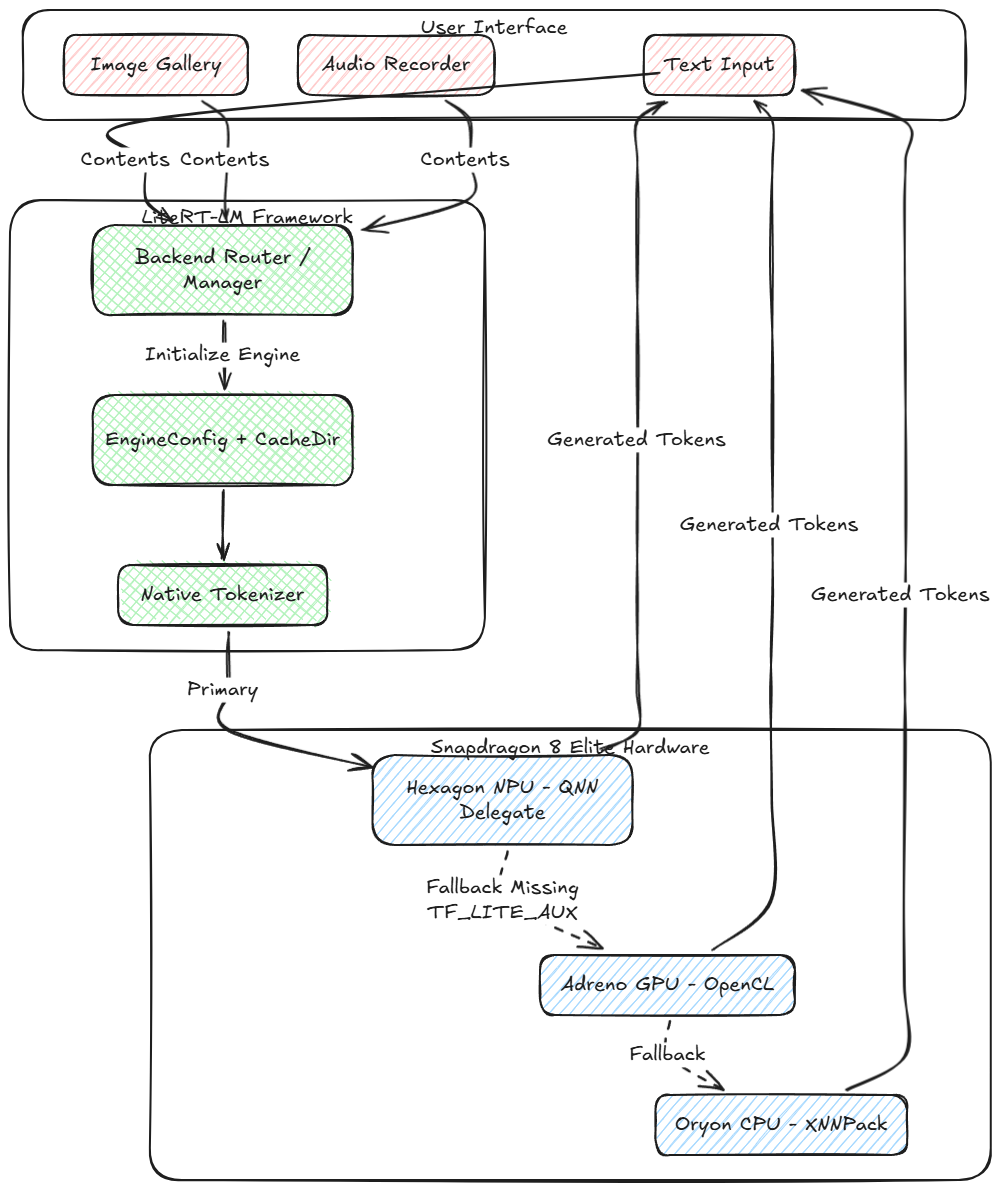
No entanto, to use the NPU, the model must contain specific precompiled QNN payload binaries (TF_LITE_AUX). In the absence of these, a robust app must properly rely on the GPU (with OpenCL/ML Drift) or the CPU (with XNNPack).
System architecture and technical changes
While upgrading our Android application from Gemma 3 to Gemma 4, we encountered several technical hurdles – from API moves to handling a huge 2.58GB payload under modern Android storage rules.
Here is a visual representation of how the new inference pipeline works on device:
![foto[1]-Trazendo Gemma Multimodal 4 E2B até o limite: A Deep Dive into LiteRT-LM and Qualcomm QNN For Windows 7,8,10,11-Winpcsoft.com](https://winpcsoft.com/wp-content/plugins/wp-fastest-cache-premium/pro/images/blank.gif)
Important implementation upgrades
1. LiteRT-LM core upgrade
Gemma 4’s architecture (particularly PLE and the new shared KV cache) requires the latest runtime. We updated our build configuration to pull the latest version of the LiteRT-LM Android libraries to ensure compatibility with the new model structure.
2. Multimodal API integration
To unlock Gemma 4’s image and audio features, we have redesigned our LiteRTLMManager. We’ve moved from plain text sendMessage() calls to the new multimodal content builder:
val contentParts = mutableListOf<Content>()
contentParts.add(Content.ImageFile(imagePath))
contentParts.add(Content.AudioBytes(audioBytes))
contentParts.add(Content.Text(textPrompt))
val contents = Contents.of(*contentParts.toTypedArray())
Adicionalmente, EngineConfig has been updated to allocate backend delegates specifically for vision and audio submodels (por exemplo. forward vision to the GPU while audio remains on the CPU).
3. Overcoming the 2.58GB payload barrier (ADB push workflow)
Downloading a 2.58GB model over a standard HTTP connection directly in an Android app is inherently unstable. Mobile networks are down, HttpURLConnection has problems with redirects and Android 15 Area-bound storage severely restricts app access to public folders like /sdcard/Download/.
A solução: We have implemented a direct ADB push detection system. Instead of relying on in-app downloads, developers and users can securely download the model to their PC and transfer it directly to the app’s unrestricted external data directory:
adb push gemma-4-E2B-it.litertlm /sdcard/Android/data/com.example.qnn_litertlm_gemma/files/ The app’s ModelDownloader class catches this at startup, validates the payload size, and initializes the engine immediately without copying or downloading, dramatically reducing load times and eliminating SocketExceptions.
4. The NPU → GPU → CPU fallback chain
Since open source model weights (like the ones on Hugging Face) often lack the device-specific precompiled QNN binaries, forcing an NPU connection can cause the app to crash.
We have implemented a lazy loading BackendFactory that attempts to spin up the NPU. When a LiteRtLmJniException is thrown (specifically reporting that TF_LITE_AUX was not found), the app immediately catches the exception, exits the NPU, and seamlessly initializes the OpenCL GPU backend instead.
Diploma
Deploying Gemma 4 E2B on an Android device is a testament to how quickly Edge AI is evolving. By combining Google’s highly optimized models, LiteRT-LM’s abstraction, and Qualcomm’s hardware acceleration, we can achieve true, private, multimodal intelligence right in our pockets.
With the technical bottlenecks in storage permissions, fallback routing, and dependency management resolved, the foundation is laid for developing the next generation of privacy-focused, context-aware mobile applications.
Trazendo Gemma Multimodal 4 E2B até o limite: A Deep Dive into LiteRT-LM and Qualcomm QNN was originally published in Google Developer Experts on Medium, onde as pessoas continuam a conversa destacando e respondendo a esta história.